Auto Blog Posting Automation to WordPress
Built an n8n workflow that automates SEO blog generation, featured image handling, and WordPress publishing—reducing content production from hours to under a minute.
Project Overview
Content marketing is essential for businesses, but creating and publishing SEO-optimized blog posts consistently is time-consuming. I built an automated content pipeline using n8n that handles everything from content generation to WordPress publishing with featured images—turning what used to be a 1-2 hour manual process into a one-minute automated workflow.
Impact: This automation has generated and published 100+ blog posts across multiple clients since November 2025, with each post taking approximately 1 minute from trigger to live publication.
The Challenge
Creating blog content for clients involves multiple tedious steps:
- Writing SEO-optimized content with proper keyword density
- Creating meta descriptions and URL slugs
- Downloading and uploading featured images
- Formatting content with internal links
- Publishing to WordPress with correct settings
- Creating follow-up tasks for content review
- Updating content calendars and tracking sheets
The manual process was inefficient:
- Even with AI assistance (ChatGPT, Claude), writers spend 1-2 hours per post going back and forth for proper context
- Featured image handling requires multiple browser tabs and uploads
- Internal linking is often inconsistent or forgotten
- Task creation and sheet updates are easily missed
Solution: End-to-End Content Automation
Architecture
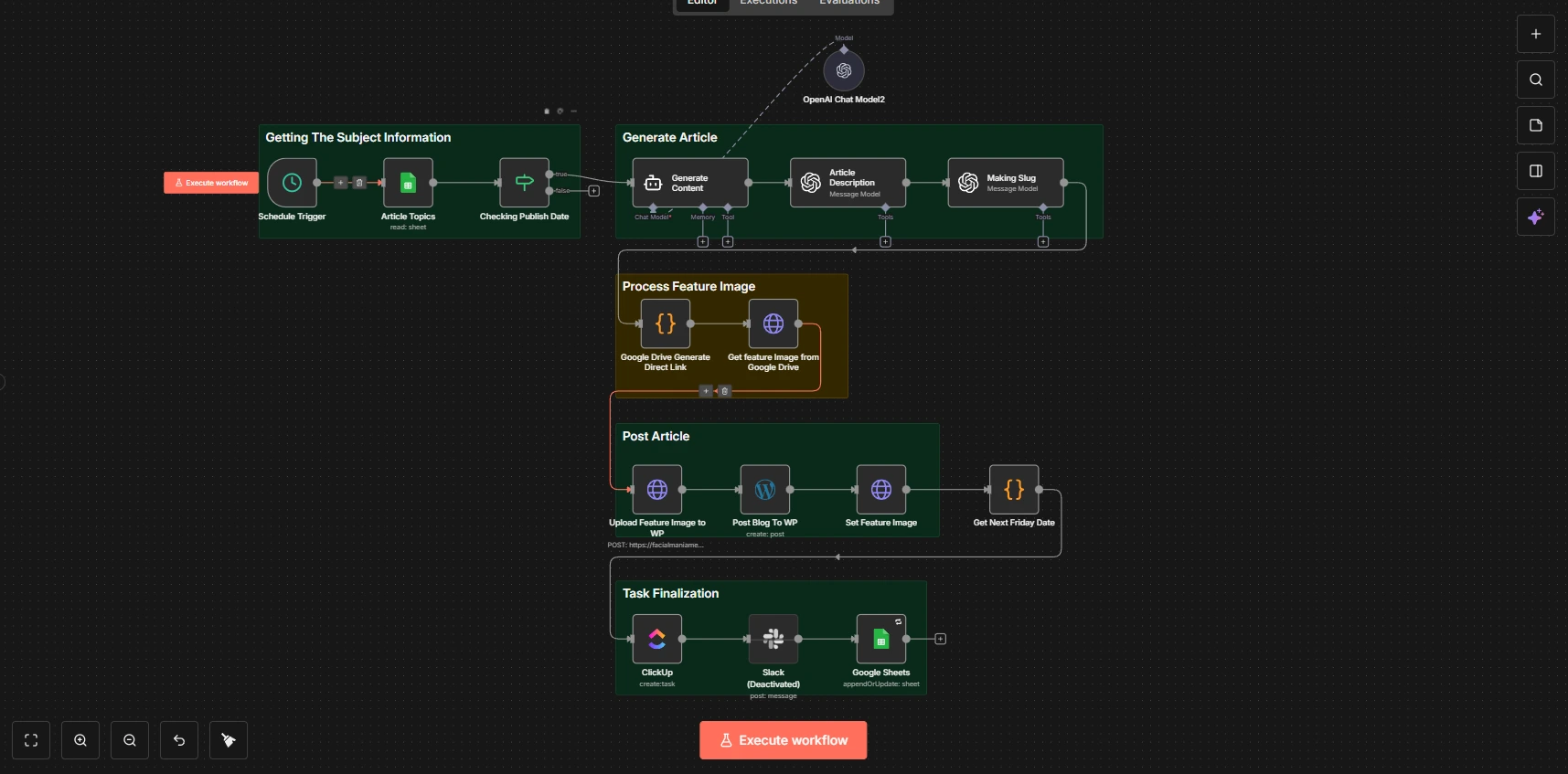
The workflow operates in five stages:
-
Content Scheduling - Schedule trigger pulls topics from a Google Sheet content calendar, checking if today matches the scheduled publish date
-
Article Generation - OpenAI generates SEO-optimized HTML content using a comprehensive system prompt with internal linking rules, keyphrase density targets, and brand guidelines baked in
-
Content Processing - Additional AI calls generate meta descriptions and URL-friendly slugs automatically
-
Image Handling - Extracts featured images from Google Drive, converts share links to direct download URLs, and uploads to WordPress media library
-
Publishing & Task Management - Posts to WordPress with proper author, status, and featured image, then creates ClickUp tasks for content review and updates the tracking sheet
Key Features
- Pre-configured Context - System prompts contain complete brand guidelines, internal linking URLs, and SEO requirements—no back-and-forth needed
- Scheduled Publishing - Content calendar in Google Sheets controls when articles go live
- Automatic Internal Linking - AI inserts relevant service links based on predefined URL mappings
- Featured Image Pipeline - Handles Google Drive → WordPress media upload automatically
- Task Generation - Creates ClickUp tasks with article links, image references, and review instructions
- Progress Tracking - Updates Google Sheets with published article URLs for client visibility
Workflow Components
The automation chains together multiple specialized nodes:
- Schedule Trigger - Runs daily at 6 AM to check for scheduled content
- Google Sheets - Reads content calendar and updates with published URLs
- IF Node - Validates publish date matches current date
- OpenAI Agent Node - Generates article content with extensive system prompting
- Code Node - Processes Google Drive links and calculates task due dates
- HTTP Request Node - Handles WordPress media uploads and post updates
- ClickUp - Creates review tasks assigned to the content team
- Slack - Notifies team of new articles (optional)
Results
| Metric | Manual Process | Automated |
|---|---|---|
| Time per post | 1-2 hours | ~1 minute |
| Context setup | Every conversation | Pre-configured |
| Internal linking | Manual, inconsistent | Automatic, rule-based |
| Featured image | Download, upload, attach | Fully automated |
| Task creation | Often forgotten | Always created |
Beyond time savings:
- 100+ posts published across multiple clients since launch
- Consistent SEO optimization with proper keyphrase density
- Zero missed internal links thanks to predefined URL mappings
- Complete audit trail through Google Sheets logging
- Reduced cognitive load - clients only need to provide topics and images
Technologies Used
- n8n - Workflow automation platform (self-hosted)
- OpenAI GPT-4 - Content generation with custom system prompts
- LangChain - Agent framework for structured AI outputs
- WordPress REST API - Publishing and media management
- Google Sheets - Content calendar and tracking
- Google Drive - Featured image storage
- ClickUp - Task management integration
- Slack - Team notifications (optional)
Lessons Learned
-
Context is everything - The difference between mediocre and great AI output is the system prompt. Investing time in comprehensive prompts with specific URLs, brand voice, and formatting rules eliminates the back-and-forth that makes manual AI-assisted writing slow.
-
Google Drive links need conversion - Share links from Google Drive don't work for direct downloads. The workflow includes a Code node that extracts file IDs and constructs proper download URLs.
-
WordPress media before posts - Featured images must be uploaded to the media library first, then attached to posts via a separate API call. The workflow handles this two-step process automatically.
-
Date comparison quirks - Comparing dates across systems (Google Sheets, n8n, WordPress) requires careful formatting. The workflow normalizes dates to avoid timezone and format mismatches.
-
Build review into the process - Automated doesn't mean unsupervised. The ClickUp task creation ensures every generated article gets human review before the client sees it, maintaining quality while saving time.
Interested in similar solutions?
Let's discuss how I can help with your project.